Design
Lines
The lines in the floorplan structure defines the architectural lines that shape the layout of the floorplan design. Each line is represented by specific properties, including "type," "color," and "thickness," which determine its appearance.
The "type" property indicates the style of the line, such as "solid_line," and can potentially include other line types like "dashed_line" or "dotted_line" for different visual effects.
The "color" property represents the color of the line, typically specified in hexadecimal format (#RRGGBB) or as an integer value.
The "thickness" property determines the width of the line, contributing to the overall clarity and prominence of the floorplan design.
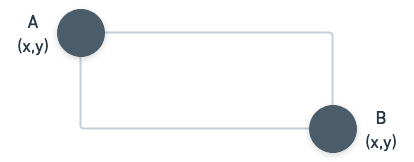
Each line is defined by two points, "a" and "b," represented by their respective "x" and "y" coordinates. These points signify the starting and ending positions of the line on the floorplan layout.
The "lines" section enables the precise representation of walls, partitions, and other architectural elements that define the layout and structure of the floorplan, contributing to the overall visualization and understanding of the design.
{
  "type": String,
  "color": Integer,
  "thickness": Integer,
  "a": {
    "x": Float,
    "y": Float
  },
  "b": {
    "x": Float,
    "y": Float
  }
}
Dimensions
The "dimensions" section in the floorplan structure provides essential measurements and dimensions for accurately representing distances and spatial relationships within the floorplan design. Each dimension is defined by specific properties, including "type" and points "a" and "b," representing the start and end positions.
The "type" property indicates the style or type of dimension line, such as "custom_dimension" or any other defined dimension types.
Each dimension line is represented by two points, "a" and "b," with their corresponding "x" and "y" coordinates. These points mark the start and end positions of the dimension line.
By using the "dimensions" section, designers can add customized dimension lines to indicate lengths, widths, and distances between various elements within the floorplan. This precise measurement representation enhances the understanding of the floorplan layout and allows for accurate scaling and positioning of architectural elements. The "dimensions" section plays a crucial role in ensuring the floorplan design adheres to specific measurements and meets the desired spatial requirements.

{
  "type": String,
  "a": {
    "x": Float,
    "y": Float
  },
  "b": {
    "x": Float,
    "y": Float
  }
}
Labels
The "labels" section in the floorplan structure enables users to add descriptive annotations and textual information to specific elements within the floorplan design. Each label is defined by various properties that determine its appearance and positioning.
The labels facilitates clear communication and enhances the understanding of the floorplan design by providing context and information about various architectural elements. Designers can use labels to denote room names, indicate specific features, or provide any relevant details about the floorplan layout, making it a crucial element for effective floorplan visualization and communication.
{
  "x": Float,
  "y": Float,
  "text": String,
  "fontFamily": String,
  "fontSize": Integer,
  "letterSpacing": Integer,
  "fontColor": String,
  "backgroundColor": String,
  "align": String,
  "rotation": Integer
}
Area's
The area's are particularly useful for highlighting distinct regions within the floorplan, such as rooms, sections, or functional spaces. The defined areas with their specified colors and labels aid in visualizing the floorplan's layout and understanding how different spaces are organized and utilized. This feature allows users to better comprehend the floorplan design and effectively communicate design intentions or functional divisions in architectural projects.
{
  "refid": String,
  "color": String,
  "rotation": Integer,
  "tx": Integer,
  "ty": Integer,
  "sx": Integer,
  "sy": Integer,
  "name": String,
  "role": Integer,
  "name_x": Integer,
  "name_y": Integer,
  "poly": [
    {
      "x": Float,
      "y": Float
    }
}
Items
The "items" section in the floorplan structure allows users to incorporate specific objects or items within the floorplan design. Each item is defined by various properties that determine its placement, dimensions, and appearance.
The "items" section is crucial for integrating furniture, fixtures, or any other elements that contribute to the functional and aesthetic aspects of the floorplan design. By incorporating items with their respective dimensions and positions, designers can create realistic representations of the floorplan, making it easier to envision how spaces will be utilized and furnished. This feature is instrumental in enhancing the overall visual appeal and practicality of the floorplan, aiding in decision-making and client communication during the design process.
{
  "refid": String,
  "x": Float,
  "y": Float,
  "z": Float,
  "width": Integer,
  "height": Integer,
  "z_height": Float,
  "rotation": Float,
  "mirrored": [
    Integer,
    Integer
  ]
}
Walls
The "walls" section in the floorplan structure defines the architectural walls that shape the layout and structure of the floorplan design. Each wall is represented by specific properties, including points "a" and "b" for defining the start and end positions of the wall.
The "walls" section plays a fundamental role in outlining the physical boundaries and divisions within the floorplan. By defining walls with their specific properties, designers can accurately represent the architectural layout and structural elements of the floorplan. This feature enables better visualization of interior spaces, facilitates space planning, and ensures the floorplan adheres to the desired architectural design and specifications.
{
  "a": {
    "x": Float,
    "y": Float
  },
  "b": {
    "x": Float,
    "y": Float
  },
  "c": Float,
  "az": {
    "z": Float,
    "h": Float
  },
  "bz": {
    "z": Float,
    "h": Float
  },
  "thickness": Integer,
  "balance": Float,
  "decor": {
    "left": null,
    "right": {
      "color": String
    }
  },
  "openings": [
    {
      "refid": String,
      "t": Float,
      "type": String,
      "frameColor": String,
      "width": Integer,
      "z_height": Integer,
      "z": Integer,
      "mirrored": [
        Integer,
        Integer
      ]
    }
  ]
}
| Name | Type | Description | Default |
|---|---|---|---|
| a | Integer | An object representing the starting position of the wall, with properties "x" and "y" for the coordinates. | - |
| b | Integer | An object representing the ending position of the wall, with properties "x" and "y" for the coordinates. | - |
| c | Integer | (Optional) An object representing the curvature of the wall, if applicable, with properties "x" and "y" for the coordinates of the curvature point. | - |
| az | Integer | An object representing the starting azimuth angle of the wall, with properties "z" for the orientation or heading angle in degrees, and "h" for the height of the wall. | - |
| bz | Integer | An object representing the ending azimuth angle of the wall, with properties "z" for the orientation or heading angle in degrees, and "h" for the height of the wall. | - |
| thickness | Integer | The width or thickness of the wall. | - |
| balance | Integer | The horizontal position of the wall's base point, allowing for customization of wall alignment. | - |
| decor | Object | An object representing the wall's decorative elements, with properties "left," "right," "top," and "outline" for specifying patterns, textures, or materials. | - |
| openings | Array | An array of objects representing openings or apertures within the wall, such as doors or windows, with properties "a" and "b" for the starting and ending positions of the opening, and "az" and "bz" for the azimuth angles of the opening. | - |